Design custom products with Printify
Creating and selling custom products has never been easier. Whether you’re new to Printify or a seasoned seller, understanding how to use Printify’s Product Creator will help you design, personalize, and publish items quickly.
This beginner-friendly guide walks you through every step – from selecting your first product to launching it in your online store.
Key takeaways
- The Product Creator is a beginner-friendly design tool that lets you make and publish custom products with a few clicks directly from your Printify dashboard.
- Create high-resolution personalized designs for apparel, home decor, wall art, and more using Printify’s built-in tools and AI image generator.
- Choose from an extensive range of Printify products and reliable printing partners to minimize shipping costs and maximize customer satisfaction.
- The Product Creator simplifies the entire process – from product selection and design to pricing, descriptions, and publishing to your eCommerce store.
- With no upfront inventory costs and an extensive network of Print Providers, Printify helps small businesses and creators start selling globally while maintaining competitive pricing and strong profit margins.
Printify’s Product Creator: An overview
The Product Creator is Printify’s upgraded design and publishing tool, built to give sellers a faster, smoother creation experience with a user-friendly interface. It helps you design a product, preview it in real time, and publish it with just a few clicks.
Key features
- Modern layout and faster navigation – Simplified side panels and layers for better visibility.
- Built-in editing tools – Upload high-resolution artwork, add personalized text, or create reusable templates.
- Real-time mockups – See exactly how your custom products will look before publishing.
- Integrated workflow – Everything happens inside the Printify dashboard, from design to pricing to publishing.
The tool benefits small businesses, creative sellers, and large businesses managing multiple brands. It saves time, reduces upfront costs, and simplifies inventory management – helping you run a low-riskcustom product business.
To access it, log in to your Printify account, open your Printify dashboard, and click Create new product. The Product Creator will open automatically with your selected item from our Catalog.
The Product Creator introduced a reimagined workflow with improved responsiveness and faster load times. The interface consolidated editing, pricing, and publishing into a single view, removing the need to switch tabs or reload designs.
For small businesses and new sellers, this means faster setup, fewer errors, and no upfront inventory costs. The tool also helps maintain competitive pricing by automatically calculating material and shipping costs from your selected Print Provider.
Design your product line now with Printify’s Product Creator. No experience required.
6 steps to design and sell a product with Printify’s Product Creator
Step 1 – Choose a product
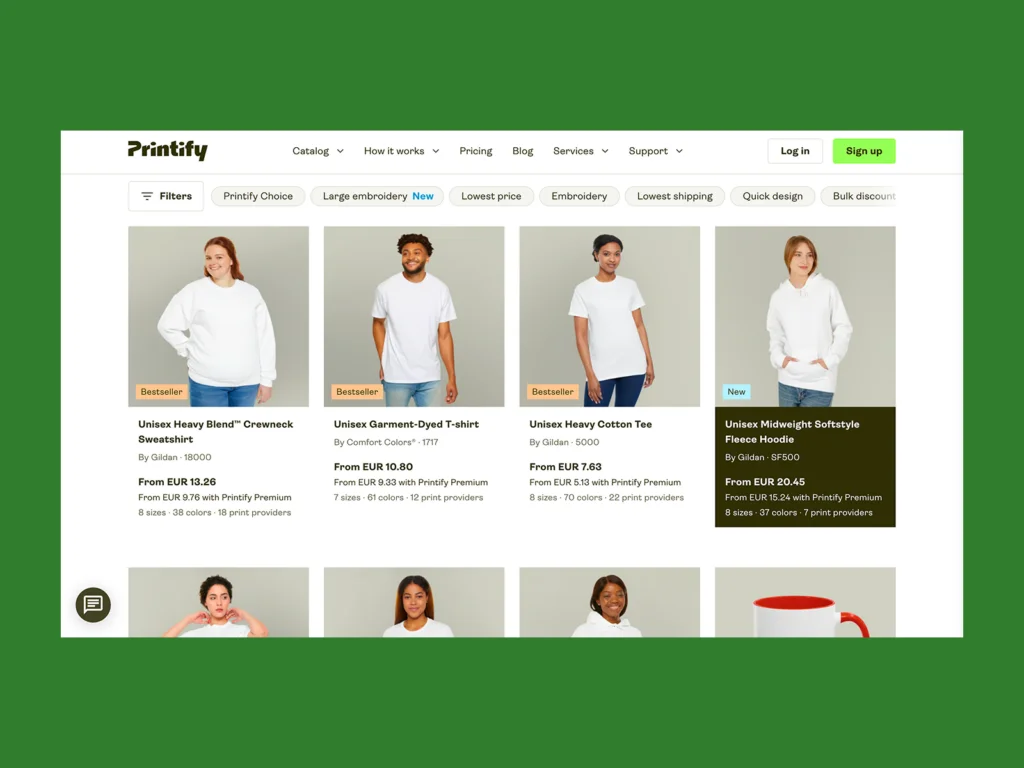
Start by selecting a base item from Printify’s Catalog. You’ll find a widerange of Printify products – from t-shirts, hoodies, and tank tops to home decor, mugs, and phone cases. Each product page displays available colors, materials, and print areas.
Browse popular categories or various categories like wall art, drinkware, and accessories to find what fits your target audience. Printify collaborates with an extensive network of printing partners so you can choose Print Providers located near your customers for faster delivery and lower shipping costs.
Review each Print Provider’s production times, high ratings, and shipping fees before selecting one. Their fulfillment speed can impact customer satisfaction and your profit margins.
Step 2 – Upload or create a design
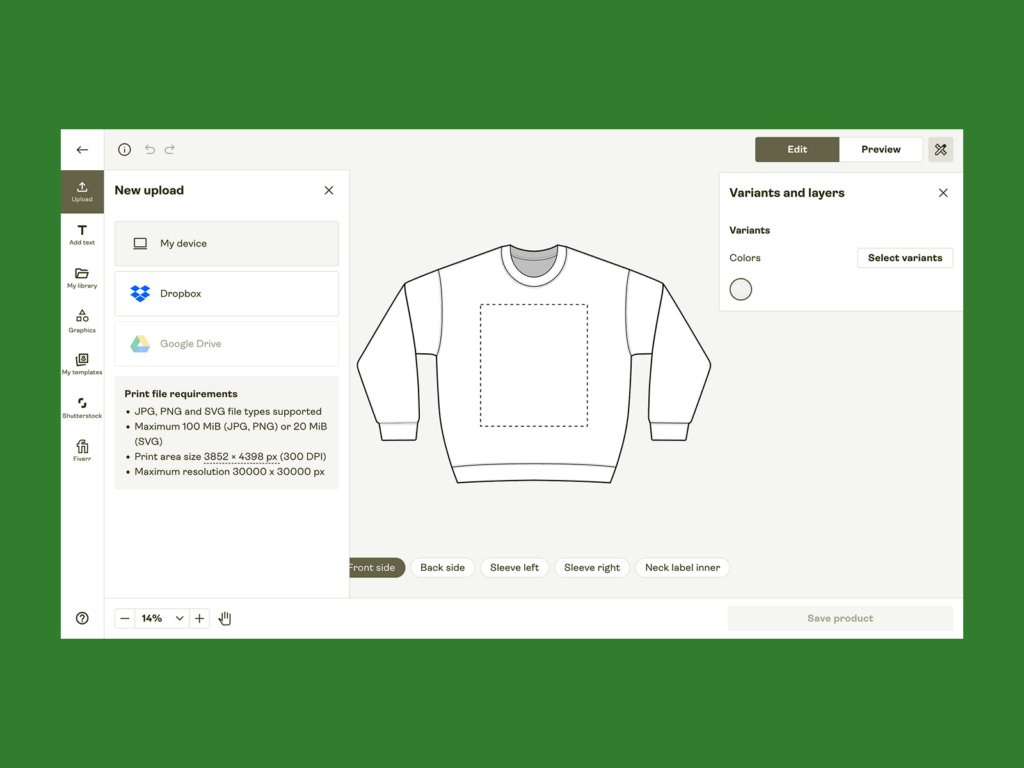
Once your base product is selected, you can create artwork directly inside the Product Creator. Upload high-resolutionimages (PNG or JPEG) or design from scratch using built-in tools.
You can:
- Upload original creative designs or personalized designs made in software like Photoshop or Canva.
- Use the AI image generator to create new artwork automatically.
- Remove backgrounds, edit layers, or adjust opacity.
- Add text elements and use curved or straight layouts for dynamic product designs.
- Explore Printify’s free graphics library or connect Shutterstock for stock images.
These tools will help you produce stunning product visuals that stand out on any eCommerce platform and will delight your customers.
If you plan to design a product line, use the template feature to save your layout and apply it to the same product or others later.
For beginners, t-shirts and hoodies are ideal for testing ideas – they sell well year-round and have large, flexible print areas. Merchants targeting interior design or lifestyle markets might explore home decor items like throw pillows or wall art. Those running a custom product business for corporate gifting can add drinkware or phone cases to their stores.
Your product selection depends on your target audience and niche. Luckily, Printify offers tools and filters in the Product Catalog to compare materials, colors, and Print Providers, helping you find products that match your brand’s identity and shipping preferences.
The Product Creator supports PNG, JPEG, and SVG (for vector designs). Always ensure your files are in high resolution (300 DPI) for crisp results.
Step 3 – Customize placement and variants
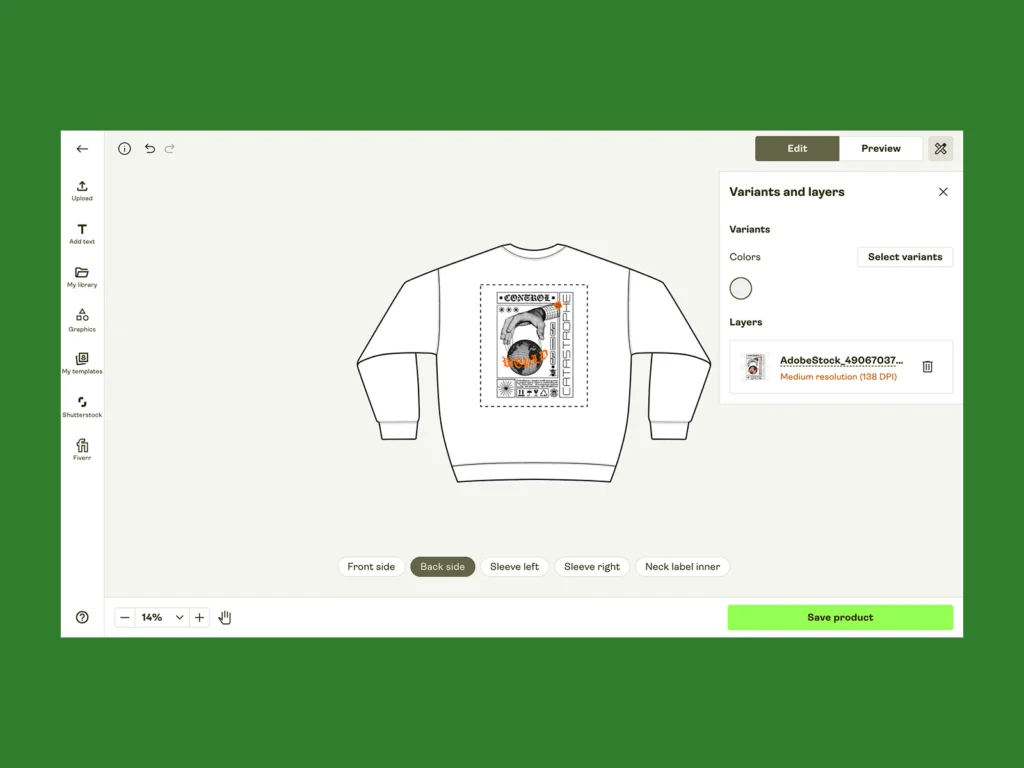
Next, fine-tune your layout. Adjust print areas (front, back, sleeves, labels, or sides) using the drag-and-drop tools in the Printify dashboard. The alignment grid helps you center artwork accurately.
You can also select color variants, size options, and SKUs. The Product Creator automatically generates mockups for each variant, allowing you to preview them individually.
Even if you’re not a designer, Printify’s Product Creator is built to be beginner-friendly. The built-in AI image generator can transform text prompts into artwork, perfect for new sellers testing concepts or seasonal themes. You can also import patterns or repeat designs using the pattern fill feature to give your custom products a cohesive look. This accessibility allows anyone to create professional-grade visuals without hiring a developer or buying expensive software.
Use the alignment guides and grid overlay to ensure consistent placement across variants. Proper scaling helps maintain customer satisfaction and professional results.
Step 4 – Preview your product
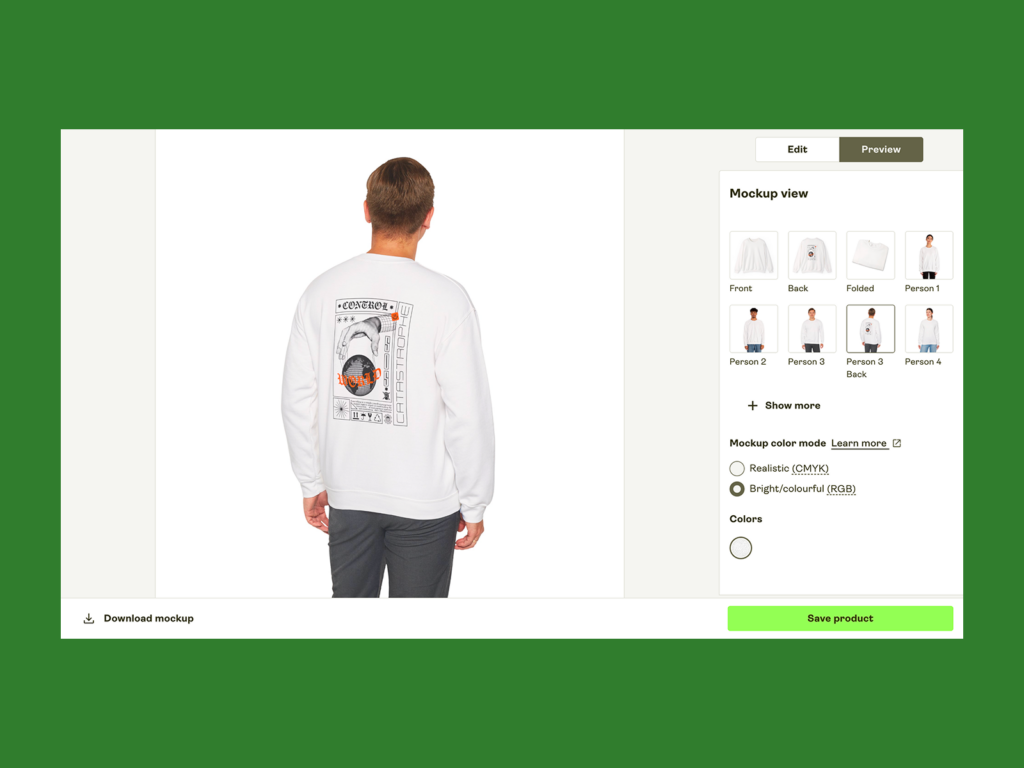
After designing, click Preview to view your product in 3D or lifestyle mockups. This real-time mockup function gives a clear idea of how your final Printify products will look.
Check:
- Alignment and proportions within print areas
- DPI and image clarity
- Color accuracy and contrast
You can even download the mockups to use in your product listings or marketing visuals. Printify automatically applies your uploaded images to the correct garment shape for a professional, consistent look.
Step 5 – Set pricing and description
Within the Printify dashboard, you’ll find editable fields for your product listings – including writing titles, descriptions, and tags.
You can:
- Set your base price and adjust your retail price to ensure competitive pricing and healthy profit margins.
- Write a description manually or use Printify’s AI description generator.
- Add details about materials, fit, and care to improve customer satisfaction and SEO performance.
The Product Creator calculates shipping costs automatically based on the selected Print Provider and region. This ensures accurate pricing for your potential buyers at checkout.
When setting prices, consider your total expenses: the base price from your Print Provider, shipping costs, and transaction fees from your major eCommerce platform. Use these numbers to calculate sustainable profit margins.
Many sellers aim for a markup of 30-50%, but you can adjust based on your niche and potential buyers. Keep in mind that Printify’s global network helps you control costs with regionally based printing partners, allowing localized production and faster delivery.
Step 6 – Publish to your store

Once your design and pricing are ready, click Publish. Choose the integration options for your connected eCommerce platforms, such as Shopify, Etsy, Wix, or WooCommerce.
If you haven’t linked your store yet, connect it through Printify’s integrations section. You can manage stores directly in the Printify dashboard, making it easy to track designs, orders, and fulfillment.
After publishing, your Printify store listings will sync automatically, showing your product details, images, and mockups in your online store or major eCommerce platform. When a customer places an order, Printify handles the fulfillment process – from printing to delivery – through its global network of printing partners.
Pro tips for using the Product Creator

Take your custom products to the next level with these advanced features:
1. Add personalization
Adding custom text or name fields can boost sales by up to 30%. The Product Creator supports personalized designs where buyers can input names or messages, making every item unique and memorable.
2. Explore embroidery products
If you want higher profit margins, try embroidered t-shirts, hats, or home decor. Embroidery gives products a premium finish and can strengthen your brand’s business identity. Many embroidery templates are ready to use, eliminating the need for digitization.
3. Use ready-made templates
Access templates for seasonal, personalization, and embroidery-ready designs inside the Product Creator. They’re perfect for testing new niches or creating cohesive product collections.
4. Create and reuse your own templates
Save your layout and apply it to multiple Printify products in your selection. This saves time when launching customizable products across various categories like apparel, accessories, and home decor.
5. Order samples
Always order a sample before publishing. It helps you verify print quality, images, and alignment. It also gives you real photos for promoting your products on social media.
6. Use mockups for marketing
Download the mockups generated in the Product Creator to showcase your Printify products on social media or email campaigns. They’re ideal for pre-launch teasers and give potential buyers a realistic look before purchase.
7. Optimize for discoverability
When writing titles and product descriptions, include relevant keywords and details (color, fit, material) to help customers find your listings. This improves your visibility across eCommerce platforms and helps you reach new audiences.
Frequently asked questions
Check that your images meet the recommended high resolution (300 DPI). A blurry preview often indicates a low-quality upload or scaling issue. Replace the file with a sharper version and recheck the mockup.
Yes. Inside your Printify dashboard, open any design and click Duplicate. You can edit it, update colors, or modify print areas to create a new product without starting from scratch.
Of course! You can order your Printify products at production cost to review quality or create merchandise for personal use. It’s a great way to confirm customer satisfaction before launching.
No. Printify operates on a print-on-demand model – there is no inventory management or minimum order quantities. Start selling right away with zero upfront costs, whether you’re testing designs or scaling your custom product business.
To summarize
Printify’s Product Creator is a powerful, beginner-friendly tool that simplifies the entire process of designing, pricing, and publishing products. With a modern design, faster navigation, and advanced tools, you can create professional custom products in a few clicks and connect them to your eCommerce store seamlessly.
From t-shirts and home decor to phone cases and wall art, Printify offers everything you need to build a scalable business – backed by a broad selection of Printify products, a global network of printing partners, and transparent shipping costs.
Whether you’re a designer, developer, or entrepreneur, Printify’s Product Creator gives you the freedom to design products, manage orders, and grow your brand efficiently.
Ready to start designing?
Create your first product today with Printify’s Product Creator and turn your ideas into sellable merchandise.