
Your business, your way – sell with Printify
Taxes can feel intimidating, but here’s the good news: Printify automatically applies sales tax in the US states where it’s registered to collect.
This doesn’t mean you’re fully exempt from collecting or paying sales tax – you’re still responsible for compliance in the states where you have sales tax nexus. But Printify helps take care of much of the complexity by handling sales tax calculation and remittance where applicable.
While we’re not tax consultants or CPAs, this guide will help you understand how to calculate sales tax and manage it confidently for your online business. Let’s dive in.
This article is for informational purposes only and does not constitute tax or legal advice. Always consult a licensed tax advisor.
Key takeaways
- Sales tax is a state-level consumption tax on goods and services, and each state sets its own sales tax rate, exemptions, and local sales tax rules, so sellers must verify their obligations carefully.
- To stay compliant, online sellers and small businesses need to understand their sales tax nexus – the connection that determines where they must collect sales tax and remit it to state governments.
- The sales tax formula is simple: Sales tax amount = Item price × Sales tax rate. Using a sales tax calculator ensures accurate sales tax calculation across different ZIP codes and states.
- Since October 2020, Printifyautomaticallyapplies and remits sales tax in registered US states, making sales tax compliance easier for Print on Demand sellers.
- Merchants can further streamline compliance by submitting resale certificates, using automation tools like TaxJar, and learning how to calculate sales tax percentage from a total amount for accurate reporting and filing.
What is sales tax?
Sales tax is a consumption tax imposed by state and local governments on the retail sale of goods and certain services. It’s calculated as a percentage of the sales price and collected by the seller at checkout. Sellers then remit that sales tax amount to the appropriate state or local government.
Unlike federal income tax, which is managed by the IRS, sales taxes are controlled at the state level. This means sales tax rates, rules, and exemptions vary by state, county, and even city.
Sales tax is considered a pass-through tax – you collect it from your customers and then pass it on to the government. The funds support public services like infrastructure, education, and healthcare.
Sales tax is not profit. Collecting it correctly ensures your business stays compliant and avoids penalties. For print-on-demand businesses like those using Printify, understanding sales tax is crucial because there are two distinct transactions involved:
- Between Printify and the merchant (you).
- Between you and your customer.
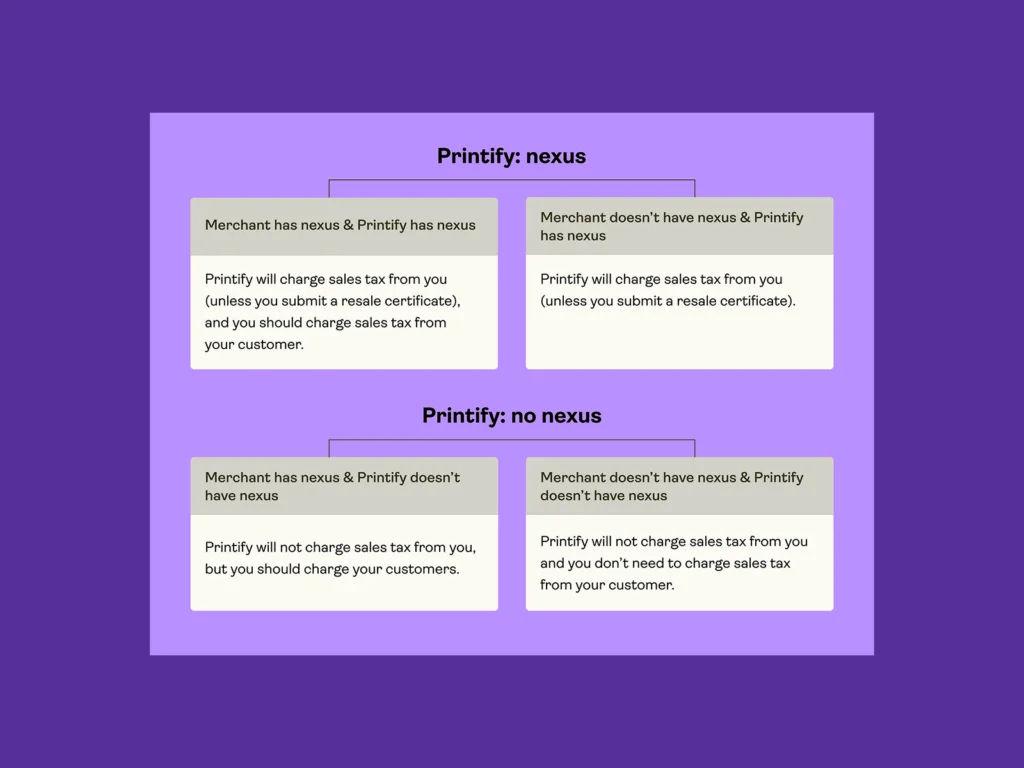
Printify collects sales tax from merchants in states where it has nexus. You, as the merchant, may also need to collect sales tax from your own customers depending on your nexus and state laws.
If a merchant in New York sells a product through Printify to a customer in California, the sale may be taxed based on the customer’s destination ZIP code.
How do you qualify for sales tax?

Whether you’re required to collect sales tax depends on where and how your business operates. Each state has its own sales tax laws, and qualifying usually comes down to the type of connection – known as nexus – your business has with that state.
Let’s look at the main factors that determine when you’re responsible for charging and remitting sales taxes.
Nexus
A sales tax nexus is the connection between your business and a state that triggers the obligation to collect and remit sales tax there.
You can establish nexus in several ways:
- Physical presence: Owning or operating from a store, office, or warehouse. Even a home office can create nexus.
- Employees: Having staff, contractors, or affiliates in a state can establish nexus.
- Inventory: Storing inventory in a state, even with a third-party logistics partner, may qualify. (Note: products stored by Printify’s Print Providers typically don’t create nexus for you.)
- Economic nexus: Reaching a state’s sales or transaction threshold (e.g., $100,000 in revenue or 200 transactions in a calendar year). Each state defines its own limit.
The South Dakota v. Wayfair case
In 2018, the South Dakota v. Wayfair Supreme Court decision redefined sales tax laws. States can now require remote sellers – even without a physical presence – to collect and remit sales tax if they exceed specific thresholds.
This ruling affected eCommerce platforms and print-on-demand businesses, making economic nexus a key compliance factor for online sellers.
Selling taxable items
Most US states impose sales tax on retail purchases, except Delaware, Montana, New Hampshire, Oregon, and Alaska (which allows local sales taxes). However, local governments within these states may still charge local sales taxes.
Some states treat clothing or essentials as non-taxable or tax them only above a price threshold. Shipping may also be taxable in certain jurisdictions. For a detailed breakdown, refer to TaxJar’s clothing taxability map and state tax foundations.
How is sales tax calculated?

Once you know where you’re required to collect sales tax, the next step is figuring out the correct sales tax calculation for each order.
Because sales tax rates vary by state, county, and city, let’s check how the sales tax amount is determined and what formula to use to ensure every transaction is accurate:
The sales tax formula
To calculate sales tax, use this standard sales tax formula:
Sales tax amount = Item price × Sales tax rate
Add the sales tax amount to the original price to determine the final price.
If a t-shirt costs $25 and the sales tax rate is 8%, then:
$25 × 0.08 = $2 in sales tax amount
Final price = $25 + $2 = $27
If you only know the total price and want to find the sales tax percentage:
Sales tax percentage = (Sales tax amount ÷ Item price) × 100
And to figure out the base price from the total:
Base price = Total amount ÷ (1 + Sales tax rate)
These sales tax calculations apply to both physical and digital goods and services unless a specific exemption applies.
Origin-based vs destination-based tax rates
Most states use destination-based sourcing, meaning the sales tax rate is determined by the customer’s location (ZIP code). A few origin-based states – like Texas – base it on the seller’s address.
Local sales tax rates often include:
- State sales tax
- County or city tax
- Special district or transportation tax
That’s why sales tax can differ between neighboring ZIP codes. Using a sales tax calculator (like TaxJar or state tools) ensures accuracy.
Sales tax for Printify merchants

Where is Printify registered to collect and remit sales tax?
Printify is required by law to collect and remit sales tax in the US states where it has nexus.
Printify collects sales tax in all US states that levy it – including Alabama, Alaska, Arizona, Arkansas, California, Colorado, Connecticut, District of Columbia, Florida, Georgia, Hawaii, Idaho, Illinois, Indiana, Iowa, Kansas, Kentucky, Louisiana, Maine, Maryland, Massachusetts, Michigan, Minnesota, Mississippi, Missouri, Nebraska, Nevada, New Jersey, New Mexico, New York, North Carolina, North Dakota, Ohio, Oklahoma, Pennsylvania, Rhode Island, South Carolina, South Dakota, Tennessee, Texas, Utah, Vermont, Virginia, Washington, West Virginia, Wisconsin, and Wyoming.
Since March 1, 2022, Printify charges sales tax in Puerto Rico.
For the latest list, always visit Printify’sSales Tax Help Center.
How Printify calculates sales tax
- Based on customer destination: Printify uses the customer’s ZIP code and local tax rates to calculate sales tax.
- Applied to taxable products and shipping: Sales tax may apply to both the item price and shipping cost, depending on the state.
- Shown at checkout: The tax is displayed at checkout and remitted by Printify to the relevant state.
- Based on sales channels and API orders: For orders imported through integrations, Printify calculates tax based on valid resale certificates or exemption data provided by merchants.
How to register and collect sales tax?
Before collecting, you need a sales tax permit from each state where you have nexus.
- US merchants: Check both physical and economic nexus rules. Once registered, you can begin collecting and remitting taxes to state governments.
- International merchants: If you sell to US customers, you might still have sales tax obligations. Always confirm whether your transactions meet nexus thresholds.
Use TaxJar’s Economic Nexus Tool to verify your requirements.
How to get a resale certificate
A resale certificate (also known as a sales tax exemption certificate) allows you to buy goods from Printify without paying sales tax, provided you intend to resell them.
To apply:
- Request a resale certificate from your state tax authority.
- Submit it in your Printify account settings under Indirect Taxes.
- Printify’s team will review it for approval.
You can use a state-specific certificate or the Multistate Tax Commission (MTC) form, which covers 38 states.
More details here: Printify resale certificate guide.
If you’re already registered for the tax/sales permit in your state/multiple states, you can prepare MTC or SSTGB certificates on your own, following our Help Center guide on tax exemption.
Setting up sales tax through your sales channel
Certain eCommerce platforms (like Etsy and eBay) act as marketplace facilitators. They automatically collect and remit sales tax on your behalf for transactions occurring on their platforms.
If your sales channel already handles this, Printify will not charge additional sales tax on those orders to prevent double taxation.
However, if you have nexus in these states, you might still need to file a zero-tax return or hold a non-reporting permit. Consult your channel documentation or a tax advisor for specifics.
How to file a return for sales tax
If you’re registered to collect sales tax, you must regularly file sales tax returns – even if no tax was collected for that period.
Tools like TaxJar AutoFile automate filing by syncing your online sales data across channels and preparing state-compliant reports.
Failure to file or pay on time can result in penalties, so always track filing deadlines based on your tax year and state frequency (monthly, quarterly, or annually).
Practical examples of sales tax calculations
| Scenario | Item price | Shipping cost | Sales Tax rate | Sales Tax amount | Final price |
|---|---|---|---|---|---|
| California (destination-based) | $20 | $10 | 7.25% | $2.18 | $32.18 |
| New York | $20 | $10 | 8.875% | $2.66 | $32.66 |
| Texas (origin-based) | $20 | $10 | 6.25% | $1.88 | $31.88 |
| Oregon (no state sales tax) | $20 | $10 | 0% | $0.00 | $30.00 |
All sales tax calculations reflect 2026 state sales tax rates and may vary by city or ZIP code.
What should you do about sales tax?
Here’s your quick action checklist:
- Determine nexus: Identify where you must collect sales tax using TaxJar’s nexus map.
- Register: Apply for sales tax permits in those states.
- Collect: Use Printify or your eCommerce platform to automatically calculate sales tax at checkout.
- Submit resale certificates: Upload approved certificates to Printify to avoid double taxation.
- Remit and file: Report and pay sales tax to the states where you’re registered.
If you don’t have nexus and no valid resale certificate, Printify will automatically collect and remit sales tax on your behalf for shipments to states where it’s registered.
Where can I get sales tax advice?
Printify isn’t a tax advisor, but we partner with TaxJar, a trusted provider of sales tax compliance solutions for eCommerce businesses.
TaxJar helps you:
- Aggregate your sales data across platforms.
- Automatically calculate real-time sales tax rates.
- File accurate returns on schedule.
We strongly recommend you consult a tax specialist or CPA to get advice on sales tax and regulations.
FAQ
Use: Sales tax = Item price × Sales tax rate.
To find the total: Total = Item price + Sales tax amount.
Printify automatically collects sales tax for transactions in states where it’s registered. You remit your own collected sales tax (from customers) to relevant state tax authorities if you have nexus.
It’s a tax on the retail sale of goods and services, charged to the consumer and passed on to the state.
Most tangible goods and some services are taxable, depending on the state. Always check state regulations for certain categories like apparel, food, or digital products.
Conclusion
You need to understand how to calculate sales tax to stay compliant and maintain your business’s financial health.
While Printify automates tax collection in many states, you’re still responsible for determining where your sales tax nexus applies, registering where required, and submitting valid resale certificates.
Use TaxJar or similar accounting software to simplify the process, keep track of sales tax rates, and avoid errors. For peace of mind, consult a qualified tax professional to ensure your setup matches current sales tax laws and state regulations.
This article is for informational purposes only and does not constitute tax or legal advice. Always consult a licensed tax advisor.