


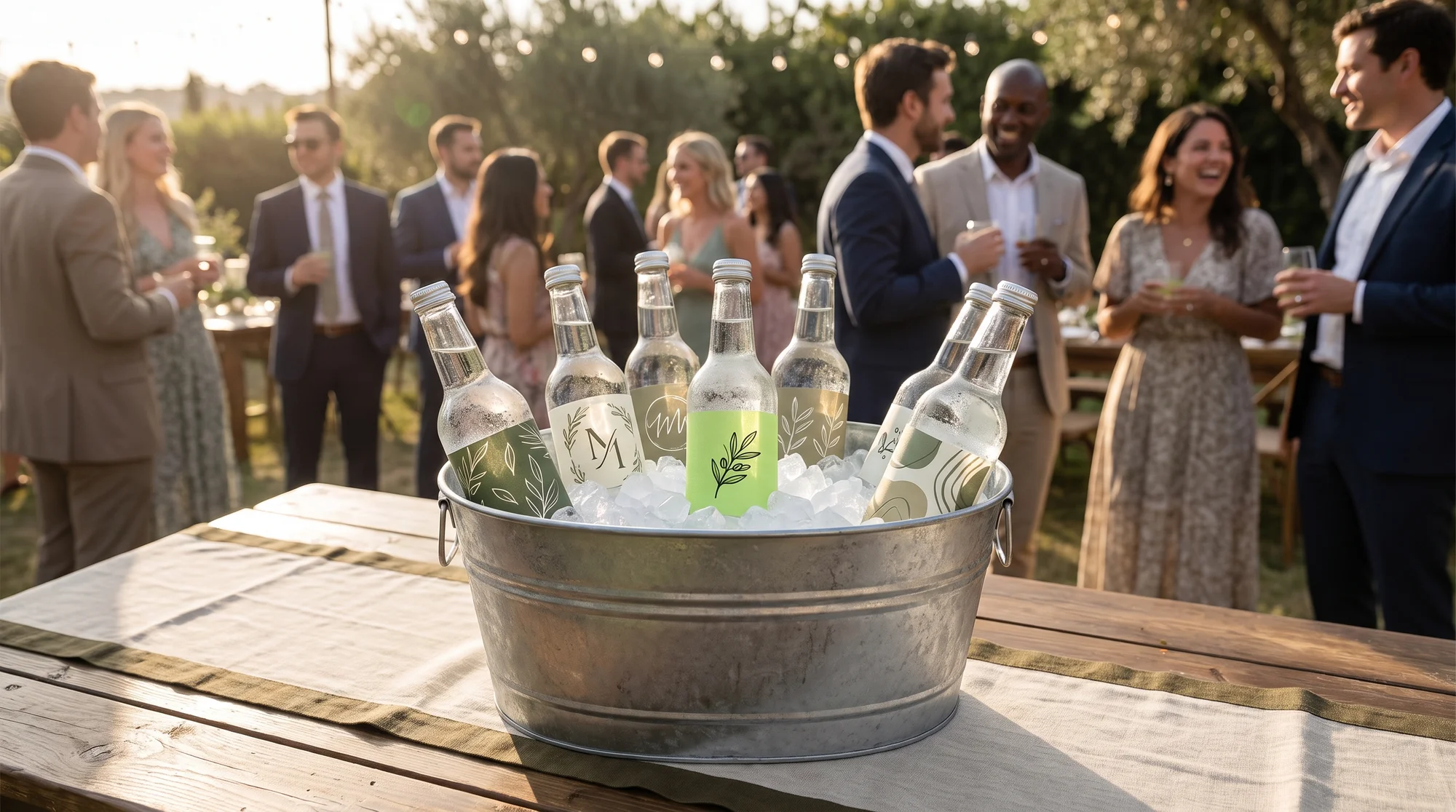
You're fighting for pennies on $12 t-shirts in a market so crowded it feels impossible to stand out. Custom water bottle labels flip that script: they're feather-light, ship in an envelope, sell in packs of 50 to 500, and carry margins that thin apparel can't touch. In this guide, you'll learn the exact vinyl specs that prevent refunds, how to launch your label line using sticker and decal blanks from the Printify Catalog, and how to land bulk wedding and corporate orders that fulfill on autopilot.
Why labels are the fastest cash lane
Weddings, birthday parties, corporate events, baby showers, and family reunions all need one thing in common: a personal touch on the water bottles guests actually hold. Nobody is serving that demand at scale with a done-for-you product. That's your opening.
The margin math beats apparel
The problem with apparel is simple: base costs eat your profit, and shipping heavy garments cuts deeper. Water bottle labels solve both.
You're selling a lightweight vinyl product in bulk packs, which means:
- Bulk order sizes: Customers buy 50, 100, or 500+ labels per event, not one shirt at a time.
- Cheap shipping: A pack of labels ships flat in an envelope, so your fulfillment cost stays tiny.
- No heavy drinkware: You never touch a single bottle. You sell the design, not the vessel.
The result is a high-perceived-value product with a low base cost, which protects your margin on every single order.
The untapped event angle
Most sellers chase saturated niches. Meanwhile, the event market is wide open because it repeats forever. There's always another wedding, another company retreat, another baby shower.
Build your line around specific occasions:
- Wedding water bottle labels (dates, monograms, and names)
- Birthday party labels (kids' themes and milestone birthdays)
- Corporate event labels (logos and conference branding)
- Baby shower and reunion labels (custom family names)
Each occasion is a repeatable, high-intent search term with buyers ready to spend.
The competitor gap to claim
Here's where the big platforms drop the ball, and where you win.
- Amazon obsesses over silicone baby bottle name bands. Scroll the reviews and you'll see the same 2-star complaints: "too big for standard bottles," "won't fit Dr Brown's," and constant fit failures. That's a pain point, not a product.
- Pinterest is DIY inspiration only. People pin ideas but there's no done-for-you product to actually buy.
- Nobody sells waterproof vinyl wrap labels for adult events at bulk scale. That gap is your lane. Claim it.
The product spec that prevents refunds
A refund kills your margin and your reviews. Most refunds on labels come from one avoidable mistake: cheap material. Nail the spec and you look like a premium brand.
Label material and adhesive standards
Paper labels fail. They peel, smear, and fall apart the moment a bottle hits an ice bucket or a fridge shelf. That single failure generates angry reviews and chargebacks.
The fix is to source waterproof glossy or matte vinyl stickers and decals with permanent adhesive. Your material must survive:
- Condensation on a cold bottle
- Full ice submersion in a bucket
- Outdoor handling at summer events
When your label holds up while the competition's peels off, your reviews sell the next 500 packs for you.
Exact sizing and template specs
A label that doesn't wrap cleanly looks amateur. Use these exact dimensions so your design fits a standard bottle edge-to-edge every time.
For a standard 16.9 oz (500 ml) bottle:
- Full-wrap canvas: 8.25in x 2in or 8in x 2.125in
- Print resolution: 300 DPI (sharp, no pixelation)
- Bleed margins: 0.125in so background colors extend past the edge with no ugly white borders
Design at these specs and every label wraps like it was made for that exact bottle, because it was.
How to launch your label line
Printify does not sell water bottle labels directly. But you don't need it to. You'll use sticker and decal blanks from the Printify Catalog as your label stock, which gives you the same waterproof vinyl and print quality without holding inventory.
Use sticker and decal blanks
The problem for new sellers is sourcing durable vinyl without a minimum order. Sticker and decal blanks in the Printify Catalog solve that with Print on Demand, so you pay only when you sell.
Start with these blanks:
- Kiss-cut vinyl stickers: Clean, waterproof vinyl ideal for individual wrap labels.
- Die-cut sticker sheets: Multiple labels per sheet, perfect for bulk event packs.
- Bumper and decal stock: Heavier-duty vinyl for maximum outdoor durability.
Load your 8.25in x 2in design at 300 DPI into the Product Creator, generate your mockups, and you have a ready-to-sell listing.
Handle personalization and bulk packs
Some buyers want one custom design; others want 500 labels for a wedding. You need to serve both without doubling your workload.
Printify's automated order routing handles it. Whether a customer orders a single personalized label or a 500-unit event pack, the order routes straight to your Print Provider and ships without you lifting a finger. That's the speed and profitability promise working for you.
Writing listings that rank and convert
Your listing has two audiences: the search algorithm that ranks you, and the human who buys. Write for both or you'll get traffic with no sales, or sales you never earn because nobody finds you.
Search bots: front-load your keyword
Search engines read the top of your listing first. Bury your keyword and you bury your ranking.
Place "custom water bottle labels" in your H1 title, your meta description, and the first paragraph of your copy. Say it clearly and early.
Human shoppers: sell the durability
Once a shopper lands, they scan. Give them what they need to trust the buy.
- Use skimmable bullet points, not walls of text.
- Describe the material with sensory detail: "thick glossy vinyl," "smudge-proof finish."
- Add a fit guide: "fits standard 16.9 oz bottles."
- Spell out care: "dishwasher-safe," "ice-bucket-proof," and "won't peel in the fridge."
Keyword placement rules
Long-tail phrases win because they match exactly what buyers type.
Place a phrase like "wedding water bottle labels bulk" in three spots:
- The listing title
- The first 50 words of copy
- Your image alt-tags
Say it once per zone. Repeating it ten times (keyword stuffing) hurts both readability and your search rank.
Push metadata to your store
Editing SEO fields inside each sales channel one by one wastes hours. Instead, edit your titles, descriptions, and tags inside Printify before you publish. Printify pushes that optimized metadata straight to Shopify, Etsy, and TikTok Shop, so your SEO travels with the product.
Squeezing more cash per order
Every event buyer is already in spending mode. The trick is to raise your average order value without adding friction.
Use these five levers:
- Free shipping thresholds: Set the bar $15 above your current average order value to nudge bigger carts.
- Personalization fees: Charge +$5 to +$8 for custom names, dates, or monograms. Buyers happily pay for it.
- Volume discount tiers: "Buy 2 packs, get 1 at 50% off" pushes larger orders.
- Matching event bundles: Pair labels with coasters, stickers, and favor tags for a complete event kit.
- In-cart upsells: Use a third-party slide-drawer app like Monster Upsell or Rebuy to offer impulse add-ons before checkout.
Bundling works especially well because you can publish complementary products, such as stickers and coasters, from the Printify Catalog and fulfill the whole multi-item order automatically.
Landing corporate and wedding orders
One 500-unit corporate order can outearn a month of one-off sales. But big buyers need custom pricing and invoicing, not a standard "add to cart."
Shopify draft orders for B2B
The problem: a company wants a custom quote and a purchase order, not a retail checkout.
The solution is Shopify Draft Orders. You can:
- Set custom tiered pricing for the volume they need
- Send an invoice email with a secure checkout link (credit card or Shop Pay)
- Use Reserve Inventory to hold the order while payment clears
Once the draft order is paid, it syncs to Printify as a standard order and fulfills automatically. You close a 500-unit deal with zero manual overhead.
Etsy custom order workflows
Etsy buyers often message you first for a custom event order. Capture it with one of two methods:
- Direct message workflow: Click Make a custom order inside the buyer's message thread to generate a private listing linked to that customer.
- Reserved listing: Create a standard listing, set it to private/reserved, and send the buyer the direct link.
SKU mapping keeps orders automated
The problem: a private or custom listing won't fulfill unless it maps correctly to Printify.
The fix: for a custom listing to fulfill through Printify, the Etsy listing must use matching Printify variant SKUs. Or, create the product inside Printify first, publish it as a hidden/draft listing, and send the buyer the direct purchase link. Either way, your custom orders route to your Print Provider without breaking your system.
Automating your fulfillment
Manual fulfillment doesn't scale. The whole point of this business is to earn while you sleep, which means your systems have to run themselves.
Native order routing
Connect Printify directly to Etsy and Shopify. Every sale, one-off or bulk, routes automatically to your Print Provider for production and shipping. No copy-pasting addresses. No manual order entry.
The one-system rule
Broken sync is the number one cause of failed orders. It happens when sellers edit products in two places at once.
Follow one rule: edit everything in Printify, never in Etsy. Printify is your master system. Edits made in Printify push cleanly to your store. Edits made directly in Etsy break the backend webhook link and stop orders from routing. Changing SKUs, editing variants, or manually marking orders fulfilled in Etsy all break the handshake, so leave those to Printify.
Organize your store for SEO
A messy store confuses both buyers and search engines. Use tag-based automated collections to fix it.
Assign standardized tags in your Printify listing editor (for example, niche:wedding, type:label). Shopify then routes those products into automated collections and generates indexable, high-SEO URLs like /collections/wedding-labels. Each collection becomes its own ranking landing page, pulling in free search traffic while you focus on designing.
Your 7-day launch checklist
Go from zero to your first bulk sale in one week.
- Day 1: Pick your niche. Choose one event lane to start (weddings convert fast).
- Day 2: Design your labels. Build at 8.25in x 2in, 300 DPI, with 0.125in bleed. Create three to five designs.
- Day 3: Set up blanks. Load your designs onto kiss-cut vinyl or die-cut sheet stock in the Product Creator and generate mockups.
- Day 4: Write your listing. Front-load "custom water bottle labels," add skimmable bullets, and spell out "ice-bucket-proof" care instructions.
- Day 5: Build your pack tiers. Publish 50, 100, and 500-unit packs with a volume discount and a +$5 personalization fee.
- Day 6: Connect automation. Link Printify to Etsy or Shopify and confirm order routing works with a test.
- Day 7: Set up bulk sales. Enable Shopify Draft Orders (or an Etsy reserved listing workflow) so you're ready for the first corporate quote.
